

Connect Shopify to
Anything with CloudQix
Automate Shopify workflows and sync data across
your entire tech Shopify— no code required.

Jumpstart with Ready-to-Use Shopify Automations
Bigcommerce With Shopify
E-commerce
The integration between Shopify and BigCommerce supports data migration for product listings inventory and orders and enables multi channel selling allowing merchants to use both platforms or switch more easily

Database With Shopify and BC
Database
Connecting a database to BigCommerce and Shopify lets businesses manage products inventory and customers in one place ensuring data consistency automating updates and supporting analysis

Shopify With LightSpeed
E-commerce
Shopify and Lightspeed integration unifies online and physical retail management by syncing products, inventory, and customer data. This provides businesses with efficient omnichannel operations and a consistent customer experience across all channels.

Shopify With SendGrid
By using SendGrid, Shopify provides merchants with reliable and customizable transactional email delivery, enhancing customer experience through improved branding and deliverability.

Shopify With SFTP
Files and Documents
Shopify SFTP FTP integration enables secure automated data transfer for exporting orders products and customers and importing inventory to support efficient data management outside Shopify

How Shopify Integrations Work with CloudQix
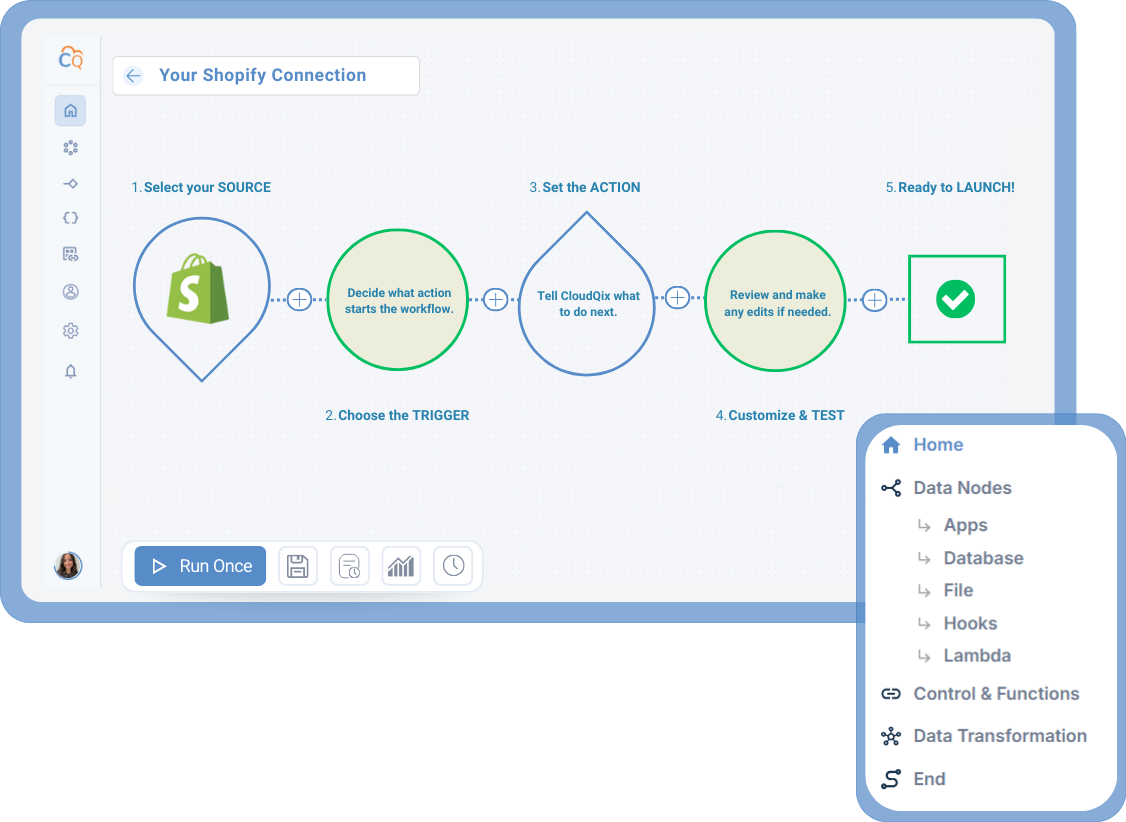
1. Connect Shopify
Securely link your Shopify
account to the CloudQix
platform.
2. Select a Trigger
Choose the event in
Shopify that will
start your workflow.
3. Choose an Action
Decide what should happen
in another app when the
trigger occurs.
4. Customize & Test
Adjust any settings, test the
workflow, and make sure that
data flows correctly.
5. Automate Workflows
Run your workflow automatically,
track performance, and update
anytime — no coding needed.
Supported Shopify Actions & Triggers
- Insert Create, update, get, and delete customers
- Get customer address
- Create address for customer
- Get customer count
- Retrieve a list of customers
- Count orders
- Get, create, update, cancel, close, reopen, and delete orders
- Create draft orders
- Search for orders
- Create, update, get, and delete products
- Get a product
- Search for products
- Count products
- List product variants
- Get, create, update, and delete product variants
- Search for inventory levels
- Adjust inventory levels
- Set inventory level for an inventory item at a location
- Connect an inventory item
- Delete inventory
- Search for inventory items
- Update an inventory item
- Create, update, and delete discount codes
- Create a price rule
- Search for discount codes
- Search for transactions
- Create a transaction
- Upload a product image
- List product images
- Delete a product image
- Retrieve fulfillments associated with a fulfillment order
- Retrieve fulfillments associated with an order
- Receive a single fulfillment
- Retrieve a count of fulfillments for a specific order
- Create fulfillment for one or many fulfillment orders
- Cancel a fulfillment
- Update tracking information for a fulfillment
- Retrieve a specific fulfillment order
- Retrieve a list of fulfillment orders for a specific order
- Send a cancellation request
- Send a fulfillment request
- Cancel a fulfillment order
- Apply a fulfillment hold on an open fulfillment order
- Release the fulfillment hold on a fulfillment order
- Move a fulfillment order to a new location
- Accept a fulfillment request
- Reject a fulfillment request
- Accept a cancellation request
- Reject a cancellation request
- Close a fulfillment order
- Create, calculate, and get refunds
- Search for refunds
- Retrieve a list of all order risks for an order
- Search for disputes
- Search for payouts
Connect Shopify to Any of These Apps











More eCommerce Integrations
Here are other popular integrations used by teams working with Shopify:
Ready to Automate
Shopify Workflows?
Start your free trial today or speak to a specialist to see how CloudQix streamlines Shopify workflows.