• Skip to primary navigation
  • Skip to main content
  • Skip to primary sidebar

CloudQix

CloudQix logoCloudQix logo light
  • Platform
    • CloudQix Platform
    • iPaaS
    • System Integrator
  • Solutions
    • Industry
      • Finance
      • Software
      • Retail
      • Transportation
    • Function
      • Sales
      • Finance
      • IT
      • Marketing
  • Apps
  • Pricing
  • Blog
  • Resources
    • Compare
      • CloudQix vs Zapier
      • CloudQix vs Manual Data Entry
    • FAQ
    • Glossary
    • Capabilities
    • How to Automate
    • About Us
    • Careers
    • Contact Us
    • Log In
  • Contact Us
  • Sign Up
Sign Up

Connect Google Calendar to
Anything with CloudQix

Automate Google Calendar workflows and sync data across
your entire tech Google Calendar — no code required.
Start Connecting for Free

Jumpstart with Ready-to-Use Google Calendar Automations

Google Calendar With File
Files and Documents

Google Calendar and SFTP integration automates file transfers based on calendar events, such as uploading meeting details beforehand or archiving reports afterward. This connection streamlines workflows by linking scheduling to secure file management processes.

Google Calendar, File
Google Calendar With File
Workflows: 1
free
Google Calendar With Slack
Communication Platforms

Google Calendar integration with Slack sends event notifications and updates to Slack channels helping teams stay aware of upcoming meetings and schedule changes

Slack bot, Google Calendar
Google Calendar With Slack
Workflows: 1
free
Google Calendar With Twilio
Messaging

Twilio send SMS reminders for upcoming events in your Google Calendar. This integration ensures you or users never miss an appointment by syncing calendar events with timely notifications.

Google Calendar, Twilio
Google Calendar With Twilio
Workflows: 1
free
URLHook To Google Calendar
Technology

Receives data from a URL hook and sends it to Google Calendar to create or update calendars and events.

Google Calendar, URLHook
URLHook To Google Calendar
Workflows: 6
free

How Google Calendar Integrations Work with CloudQix
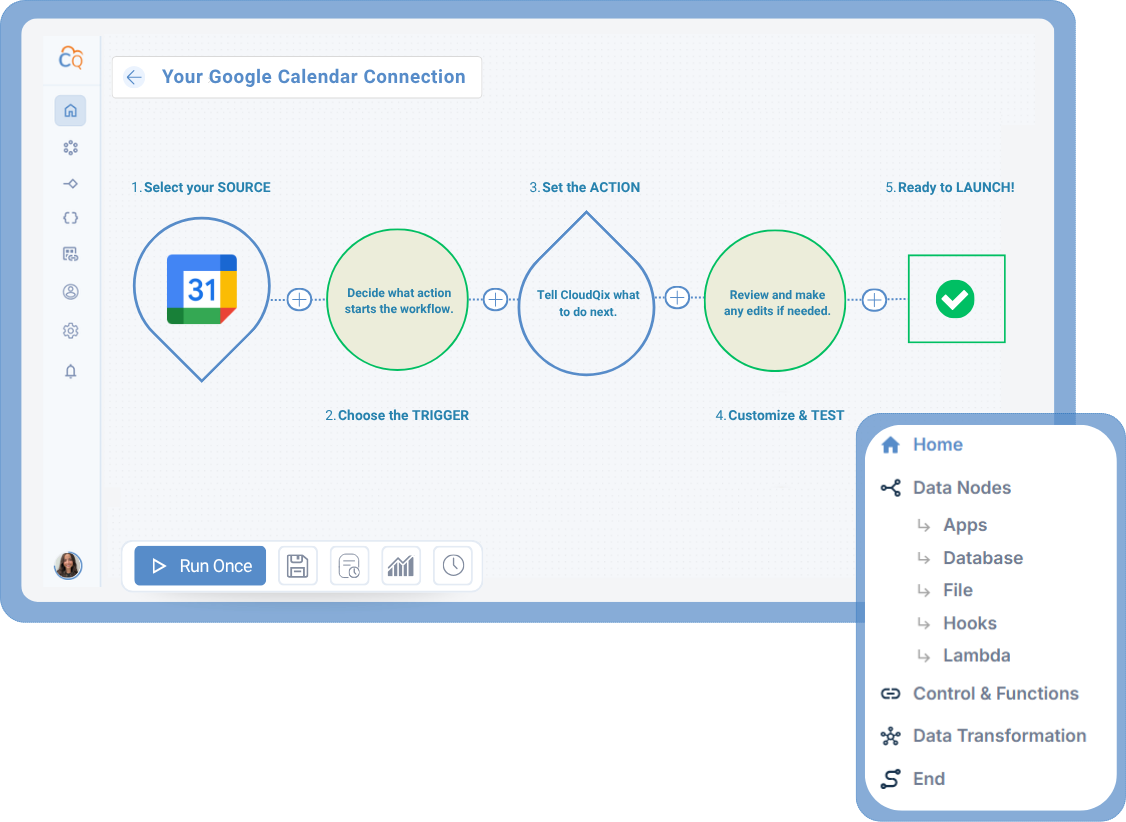
1. Connect Google Calendar

Securely link your Google Calendar
account to the CloudQix
platform.

2. Select a Trigger

Choose the event in
Google Calendar that will
start your workflow.

3. Choose an Action

Decide what should happen
in another app when the
trigger occurs.

4. Customize & Test

Adjust any settings, test the
workflow, and make sure that
data flows correctly.

5. Automate Workflows

Run your workflow automatically,
track performance, and update
anytime — no coding needed.

Supported Google Calendar Actions & Triggers

Connect Google Calendar to Any of These Apps

SendGrid
hubspot
Facebook logo

More CRM Integrations

Here are other popular integrations used by teams working with Google Calendar : 

  • Microsoft Calendar 
  • Gmail 
  • Microsoft Teams 
  • Twilio 

Ready to Automate
Google Calendar Workflows?

Start your free trial today or speak to a specialist to see how CloudQix streamlines Google Calendar workflows.

Get Started for Free
Talk to a Specialist

Primary Sidebar

CloudQix logo light
  • WHY CLOUDQIX
    • Solutions
    • What is iPaaS?
    • What is a System Integrator?
    • CloudQix vs Zapier
    • CloudQix vs Manual Data Entry
    • Pricing & Features
  • RESOURCES
    • Frequently Asked Questions
    • Glossary
    • Blog
  • COMPANY
    • About Us
    • Careers
    • Contact Us
  • GET STARTED
    • View Featured Apps
    • Start Free Account
    • Log in

Link to company LinkedIn page

Link to company Instagram page

Link to company YouTube page

Link to company Reddit page

  • WHY CLOUDQIX
    • Solutions
    • What is iPaaS?
    • What is a System Integrator?
    • CloudQix vs Zapier
    • CloudQix vs Manual Data Entry
    • Pricing & Features
  • RESOURCES
    • Frequently Asked Questions
    • Glossary
    • Blog
  • COMPANY
    • About Us
    • Careers
    • Contact Us
  • GET STARTED
    • View Featured Apps
    • Start Free Account
    • Log in

© 2026 CloudQix·Privacy Policy·Contact Us

© 2026 CloudQix·Privacy Policy·Contact Us

Link to company LinkedIn page

Link to company Instagram page

Link to company YouTube page

Link to company Reddit page